![Unific-Logo-Purple-1.svg]](https://help.unific.com/hubfs/Unific-Logo-Purple-1.svg)
This KB article explains where Payment Terms can be configured and when the Payment Terms information will appear in HubSpot.
1. Key Points :
(a) Payment Terms can only be configured on Company Locations.
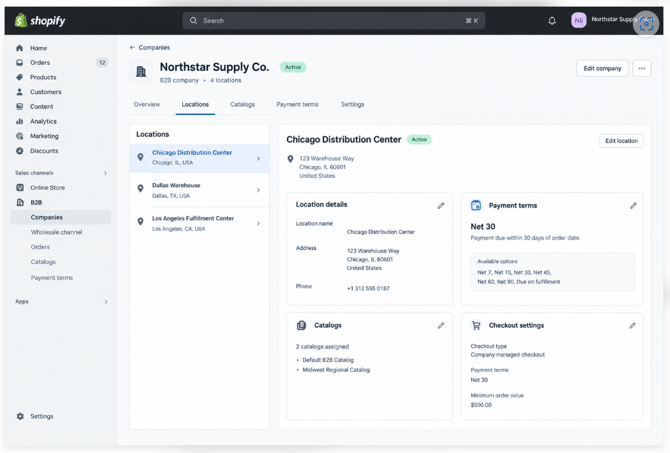
(b) Payment Terms cannot be configured directly at the parent Company level.
(c) Ensure that the required Company Location is selected when configuring Payment Terms.
(d) If a customer has multiple Company Locations, Payment Terms may need to be configured separately for the applicable locations.
2. Payment Terms must be configured in Shopify
Payment Terms will appear in HubSpot only when they have been configured for the corresponding customer/company location in the Shopify store.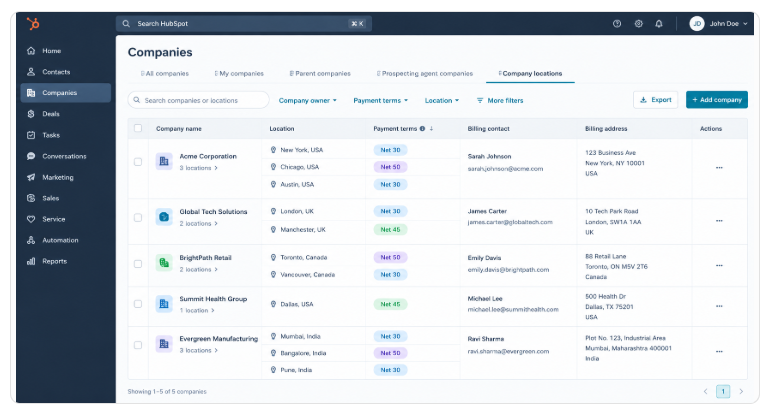
Important: Simply having a Company Location in HubSpot does not automatically populate Payment Terms.
The expected flow is:
Shopify Store → Payment Terms configured → Sync → HubSpot Company Location
If Payment Terms are not configured in Shopify, the Payment Terms field in HubSpot will remain blank/unpopulated.
Troubleshooting Checklist
If Payment Terms are not appearing in HubSpot:
- Verify that the correct Company Location is being reviewed in HubSpot.
- Check whether Payment Terms have been configured for the customer/location in Shopify.
- Confirm that the Shopify customer/location is correctly synced with the corresponding HubSpot Company Location.
- If Payment Terms are configured in Shopify but are still missing in HubSpot, investigate the sync status and configuration.
Summary
Question
Answer
Where can Payment Terms be configured?
Company Location level
Can Payment Terms be configured directly on the parent Company?
No
Does HubSpot show Payment Terms automatically?
No
What is required for Payment Terms to appear in HubSpot?
Payment Terms must be configured in Shopify and successfully synced
Where should you check first if Payment Terms are missing?
Shopify Company Location configuration
Remember: Payment Terms are Company Location-level information, and they will appear in HubSpot only when they are configured in Shopify and successfully synced.