![Unific-Logo-Purple-1.svg]](https://help.unific.com/hubfs/Unific-Logo-Purple-1.svg)
Key Concepts:
- Company (Parent): The top-level organization/account (e.g., corporate entity, global billing account).
- Company Location (Child): Physical facilities, retail branches, warehouses, or regional offices with distinct shipping addresses, specific tax configurations, assigned catalogs, and localized buyer permissions.
- Catalogs & Pricing: B2B price lists and catalogs can be mapped directly to individual locations or aggregated across all child locations up to the parent company.
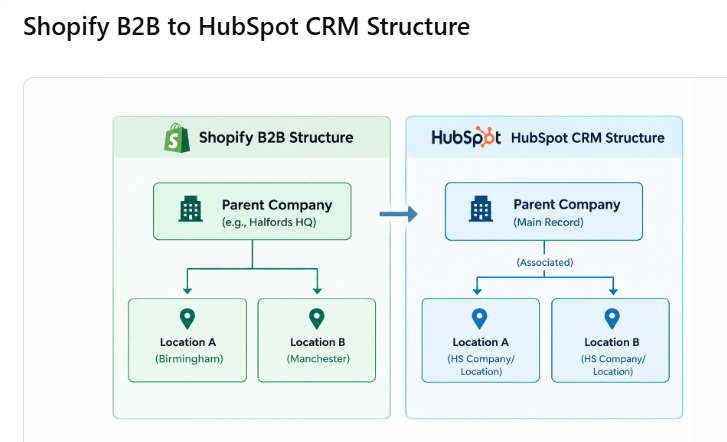 2. Data Mapping & Sync Flow
3. Standard Setup & Verification WorkflowShopify B2B Object
HubSpot CRM Entity / Property
Description
Company Name
Company name
Primary legal name of the organization.
Company ID
shopify_company_id
Unique identifier used for database matching and deduplication.
Company Location Name
Company / Location name
Location name (often formatted as [Company] - [City/Branch]).
Location Address
Address, City, State/Region, Zip, Country
Specific physical/shipping address for that facility.
Catalog Mappings
Associated Catalogs
Price lists tied to the specific location and aggregated at the parent level.
B2B Contacts / Staff
Associated Contacts
Authorized buyers mapped to their designated location(s) and parent company.
Step 1: Verify Account Configuration & Feature Activation
- Log into the Unific Dashboard.
- Navigate to Connected Accounts and ensure both Shopify and HubSpot are active with valid API authorizations.
- Confirm that the store is on a plan supporting B2B / Multi-Location sync (e.g., Advance Plan / Quotific CPQ tier).
Step 2: Trigger Historical Synchronization
- From Unific, go to Historical Sync.
- Run the Company Historical Sync first to ensure parent records exist in HubSpot.
- Once parent companies are processed, trigger the Company Locations Historical Sync.
Step 3: Verify Records in HubSpot
- Navigate to HubSpot CRM > Contacts > Companies.
- Search for the parent company (e.g., Halfords).
- Open the record and verify:
- Child locations are correctly linked under associated companies/locations.
- Address details and location identifiers match Shopify.
- Associated customer contacts reflect the proper location assignments.
4. Quotific CPQ IntegrationWhen using Quotific to generate quotes and B2B draft orders:
- Location Selection: Selecting a client in Quotific allows agents to specify the exact company location.
- Price Application: Quotific automatically applies the custom catalog pricing assigned to that location.
- Draft Order Push: Address details (billing and shipping) and location metadata transfer directly to the Shopify Draft Order without manual entry.
Issue 1: Location Count Discrepancy Between Shopify and HubSpot
- Symptoms: Shopify shows 200 locations, but HubSpot reflects fewer (e.g., 140).
- Root Causes:
- Historical sync queue in progress: Large historical batches process asynchronously and may take time to fully populate.
- Transient rate-limiting or service scaling: API rate limits during large bulk syncs.
- Duplicate location names: Deduplication logic may prevent duplicate names under the same parent from creating duplicate HubSpot records.
- Resolution:
- Check the Unific sync logs for any failed payload errors.
- Re-trigger the Company Location historical sync from the Unific portal.
- If records remain missing, verify whether locations in Shopify share duplicate names or missing address fields.
Issue 2: Catalog Pricing Not Reflecting on Location
- Symptoms: Location buyers see standard pricing instead of negotiated catalog rates.
- Root Causes: Catalog mapping missing at the location level or polling schedule delay.
- Resolution:
- Verify in Shopify Admin that the B2B catalog is actively assigned to the target location.
- In Quotific, use the refetch/sync action to pull updated catalog mappings from Shopify.
Issue 3: Address / State Missing on Shopify Draft Order Transfer
- Symptoms: Quotes converted to Shopify draft orders are missing province/state or company shipping fields.
- Resolution:
- Ensure standard ISO country and state/province codes are maintained in HubSpot company address fields.
- Confirm Quotific address transfer settings are mapped for both Shipping and Billing.
6. Best Practices- Consistent Naming: Adopt a standard naming convention in Shopify for locations (e.g., Company Name – Location/City Name).
- Sync Order: Always run or verify Parent Company sync before running Company Location syncs.
- Regular Audits: Periodically compare company and location counts between Shopify Admin and HubSpot views to catch any disconnected records early.